Dentalion: A Script Font for Modern Web Design Projects
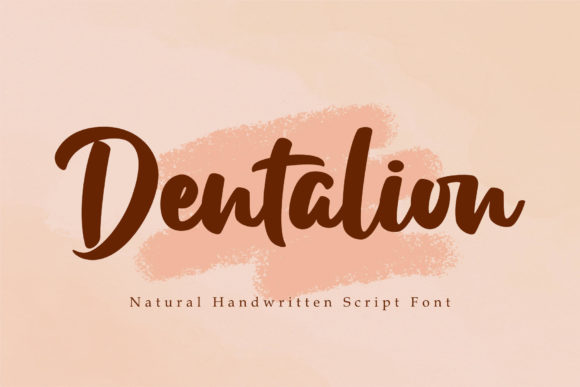
I was staring at a blank hero section on a client’s coaching website, trying to find the right visual anchor. The layout was clean, minimal, and heavily reliant on whitespace. We needed something that felt personal and handcrafted but still held up under the scrutiny of high-resolution mobile screens. That was when I pulled Dentalion into the design file. It is a lovely paint brushed script font, and unlike many display fonts that feel overly rigid or digitally stiff, this one has a beautiful and balanced character. It fits well with the large design pool of modern web aesthetics, offering that human touch without sacrificing professional polish.
Testing a new typeface in a real-world digital environment is always a mix of excitement and caution. You want the personality to shine, but you also need to ensure the user experience remains smooth. When I first dropped Dentalion into the headline area, the immediate effect was striking. It didn’t scream for attention; instead, it invited the reader in. This is crucial for landing pages where trust is built through subtle cues rather than aggressive shouting. The font’s natural flow mimics the rhythm of speech, which can subconsciously make your copy feel more conversational and approachable.
The Visual Personality of Dentalion
At its core, Dentalion is a creative font that bridges the gap between traditional calligraphy and modern digital typography. Its strokes vary naturally, giving it an organic feel that stands out against geometric sans serif fonts. However, it avoids the trap of being too chaotic. The balance in its letterforms means it doesn’t compete with imagery or other design elements. Instead, it complements them. This makes it an excellent choice for brands that want to convey elegance, creativity, and authenticity.
In the world of online stores and boutique portfolios, visual hierarchy is everything. Dentalion serves as a powerful tool for establishing that hierarchy. When used for section headings or key value propositions, it breaks the monotony of standard text blocks. It draws the eye naturally, guiding users through the page in a way that feels intuitive. For example, on a product landing page, using Dentalion for the main offer title creates a focal point that feels curated and special, elevating the perceived value of the product or service being presented.
Readability and Digital Performance
One of the biggest challenges with script fonts is readability, especially on smaller devices. I spent considerable time testing Dentalion across various screen sizes, from desktop monitors to compact smartphones. The good news is that its balanced character helps maintain legibility even when scaled down. However, like any decorative typeface, it requires strategic placement. It shines brightest in short phrases, headlines, and logo text. Using it for long paragraphs of body copy would likely hinder scanning behavior and frustrate users looking for quick information.
To maximize engagement, I recommend using Dentalion for hero titles, campaign headers, and decorative accents. Pair it with a simple sans serif font for body copy. This combination leverages the strengths of both typefaces: the script adds character and brand identity, while the sans serif ensures clarity and ease of reading. This pairing is particularly effective for course sales pages and blog redesigns, where you want to maintain a professional editorial tone while injecting some creative flair.
Another practical consideration is the background. Dentalion works beautifully over light backgrounds, where its dark, ink-like strokes provide strong contrast. On image banners, it performs well as long as there is sufficient contrast or a subtle overlay to prevent the text from getting lost. I often use a semi-transparent box behind script headlines to ensure accessibility standards are met, ensuring that all users, including those with visual impairments, can read the content comfortably.
Practical Applications for Digital Creators
- Boutique Online Stores: Use Dentalion for sale announcements, collection names, or "About Us" section headers. It adds a touch of luxury and care to the shopping experience.
- Coaching Websites: Ideal for testimonials, quote blocks, and mission statements. The handwritten style reinforces the personal connection between the coach and the client.
- Creative Portfolios: Perfect for project titles and category labels. It showcases artistic sensibility without overwhelming the portfolio grid.
- Digital Brand Kits: Incorporate Dentalion into social media graphics and email newsletters. Its versatility allows it to adapt to different contexts while maintaining brand consistency.
- Campaign Landing Pages: Use it for urgency-driven headlines or limited-time offer badges. The dynamic nature of the brush strokes can create a sense of energy and movement.
Technical Considerations for Web Implementation
Before integrating Dentalion into a live project, it is essential to check the technical specifications. Dentalion is PUA encoded, which means you can access all of the glyphs and alternate characters. This is a significant advantage for designers who want to add custom flourishes or specific stylistic touches without relying on external icons or images. However, PUA encoding requires careful implementation to ensure that the correct characters map to the intended symbols in your code.
When preparing the font files for web use, consider the format. Webfont formats like WOFF2 are optimized for fast loading, which is critical for maintaining good site performance scores. Slow-loading fonts can negatively impact user experience and SEO rankings. Ensure that you have the necessary commercial font licensing if you are using Dentalion for client projects, online stores, or any monetized digital templates. Understanding the license terms protects both you and your clients from legal issues.
Additionally, explore the included styles and weights. While Dentalion may not come in a wide range of weights like a standard sans serif family, the variations within the script can be used creatively. Bold versions might work for primary headlines, while lighter or thinner variants could serve as secondary accents. Testing these options helps you build a cohesive typographic system that enhances the overall brand identity.
Building Trust Through Typography
Typography is more than just choosing pretty letters; it is about communicating reliability and professionalism. A well-chosen font like Dentalion can significantly influence how users perceive your brand. When a website looks polished and thoughtfully designed, it builds trust. Users are more likely to engage with content, sign up for newsletters, or make purchases when the visual experience feels credible and high-quality.
By carefully selecting Dentalion for specific elements, you demonstrate attention to detail. This small investment in design pays off in increased user engagement and stronger brand recall. Whether you are redesigning a blog header or creating a new digital product launch page, taking the time to evaluate how a font interacts with your layout and audience is a step toward creating a more effective and enjoyable online presence. Dentalion offers the perfect blend of artistry and functionality, making it a valuable addition to any designer’s toolkit for modern web projects.